

Invoice Extraction and categorization
Developed by Phacet
Automatically extract, structure, and quality-score every field from supplier invoices, getting them ready for accounting entry, ERP integration, or audit.
The problem solved by this workflow
Your company receives supplier invoices as PDF files, with different formats, layouts, or content.
Your team needs to manually open each one, types the supplier name, invoice number, amounts, dates, and line items into your accounting system or a spreadsheet. Then someone else checks that the data was entered correctly.
This template replaces both steps: the data entry and the verification.
Use this template if:
- Supplier invoices arrive as PDF files (emailed, uploaded, or forwarded from another system)
- Your team spends time keying invoice data into an ERP, accounting tool, or spreadsheet
- You need structured, machine-readable invoice data for downstream systems
- You want a built-in accuracy check before data reaches your accounting system
The impact
Eliminate manual data entry from invoice processing.
Every invoice is read and data extracted automatically: supplier name, invoice number, dates, amounts, address, payment method, and every line item.
Your team reviews structured results instead of typing from PDFs.
Catch extraction errors before they reach your books.
Every invoice goes through a double-extraction quality check. The agent reads the invoice twice independently and compares results field by field, producing a confidence score and flagging discrepancies.
Get integration-ready output without reformatting.
Every invoice produces a clean JSON payload with standardized fields, ready for direct consumption by your ERP, accounting system, or automation workflow.
No intermediate spreadsheet, no copy-paste.
Enrich supplier data automatically.
The agent looks up each supplier on public registries (Pappers.fr) to retrieve the company creation date, and classifies the supplier by industry sector, adding context for supplier due diligence without manual research.
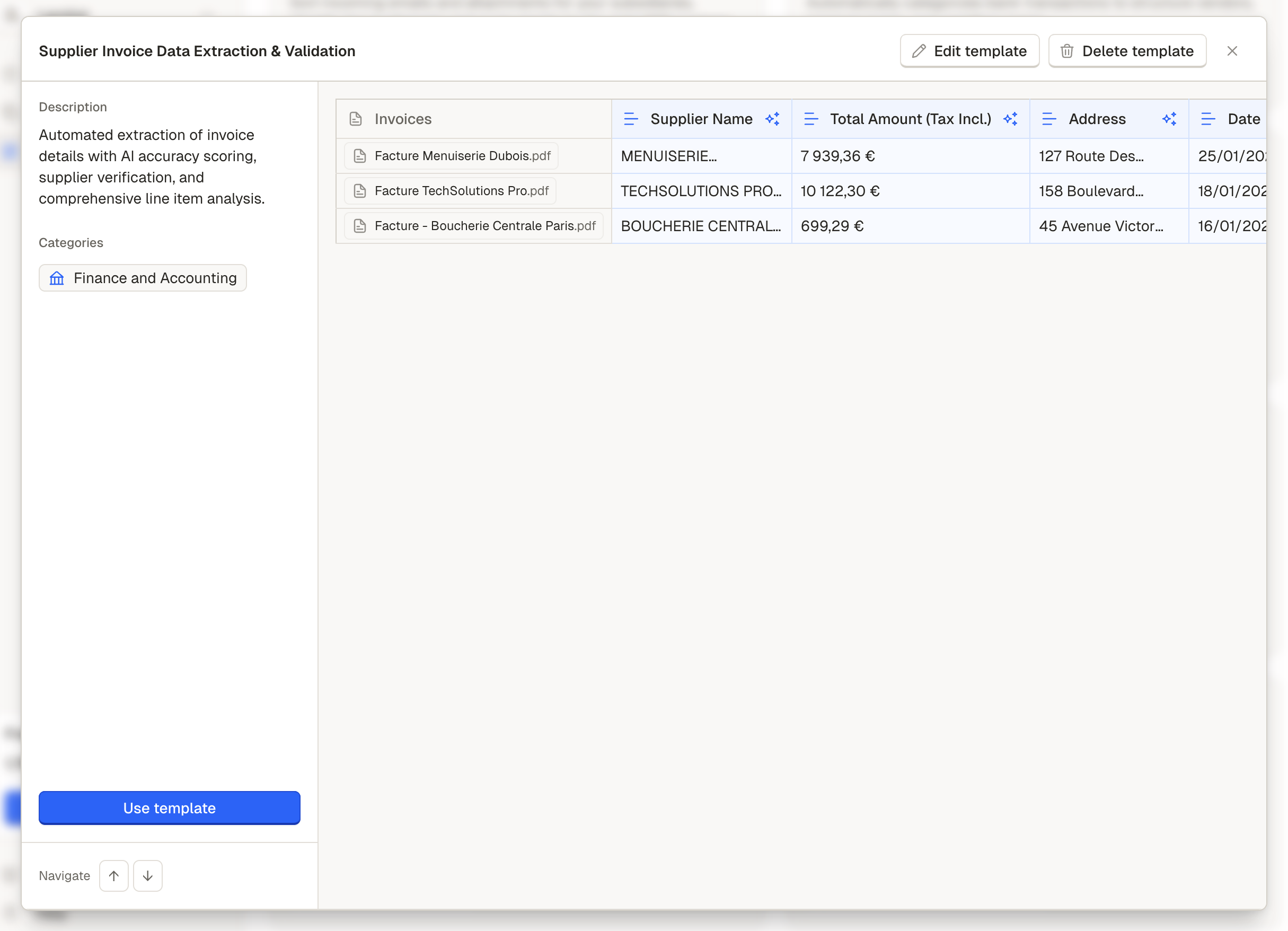
Acces this template via the Template Gallery
How your agent processes each invoice
Every invoice PDF that enters the workflow goes through six stages:
Invoice PDF → Extract core fields → Extract line items → Enrich supplier data → Classify industry → Export JSON → Quality-score the extraction
Inputs
For each invoice, the template needs the PDF file. Optionally, you can add a manual matching reference (e.g., internal PO number) and a transaction code for accounting purposes.
Invoices can be uploaded manually, pushed via Zapier/Make/n8n, or forwarded from another Phacet template (e.g., AI Inbox).
Processing stages
1. Core field extraction. The agent reads the invoice PDF and extracts nine fields: supplier name, invoice number, invoice date, total amount (tax included), tax amount, supplier address, delivery date, due date, and payment method. Each field follows strict formatting rules.
2. Line items extraction. The agent identifies the invoice's line-item table and extracts each row as a structured record: description, product code, quantity, unit price (excl. tax), line total (excl. tax), tax, total (incl. tax), and origin. Each invoice produces a set of child rows (one per line item) enabling product-level cost allocation and detailed accounting entries.
3. Supplier web enrichment. The agent searches Pappers.fr (the French public business registry) using the extracted supplier name to retrieve the company's official creation date. This adds a due diligence data point without manual lookup.
4. Industry classification. Based on the line items and supplier name, the agent classifies the supplier into one of 19 industry categories (IT, Manufacturing, Professional Services, Construction, etc.).
This enables spend analysis by sector across your invoice volume.
5. Structured JSON export. The agent consolidates the key extracted fields into a single validated JSON object. This payload is ready for direct consumption by accounting systems, ERPs, or API-driven workflows.
6. AI quality control. The agent performs a second, independent extraction of the same invoice and compares it field by field against the first extraction.
Each field receives a confidence score (0–100%) with a rationale for any discrepancy.

Each invoice field is accessible in a structured way
Where your team steps in
After the agent runs, your work concentrates on two things:
- Low-scoring invoices: any invoice with an overall AI score below your threshold needs a human review of the flagged fields
- "Not specified" fields: invoices where the agent couldn't find a delivery date, due date, or payment method may need manual completion
Every extraction decision is visible in Review with citations from the source PDF: the section where the supplier name was found, the line used for amount extraction, the identifier matched for classification.
You audit a structured analysis, not a black box.
Example results
Three scenarios showing possible outputs after the agent processes an invoice batch, and how your team can react.
1/ Clean extraction : high confidence
In this specific case, Phacet was able to extract each items precisely and with high confidence. You can use the data extracted immediately, without review.
| Field | Value |
|---|---|
| Supplier | Durand & Fils SARL |
| Invoice Number | FAC-2024-0892 |
| Date | 15/03/2024 |
| Total (Tax Incl.) | 2 394,00 € |
| Tax | 399,00 € |
| Payment Method | Bank transfer |
| Line Items | 4 items extracted |
| Industry | Professional Services |
| Overall AI Score | 98% |
In Detail view, citations show the PDF header where the supplier name was found, the IBAN section confirming bank transfer, and the line-item table used for amount breakdown.
2/ Uncertain item in extraction, need human review
In this case, AI scoring evaluation flagged an inconsistency in the pre-tax amount.
A team member opens the original PDF, confirms the correct figures, and corrects the extraction before it reaches the accounting system.
Without the quality check, the wrong amount would have been posted silently.
| Field | Value |
|---|---|
| Supplier | Martin Consulting SAS |
| Invoice Number | 2024-MC-047 |
| Date | 08/12/2023 |
| Total (Excl Incl.) | 5 640,00 € |
| Tax | 940,00 € |
| Payment Method | Payment at 30 days |
| Line Items | 6 items extracted |
| Overall AI Score | 78% |
| AI Scoring Rationale | Amount excl. tax: Second extraction found 5,800 € vs 5,640 € in the first one |
Learn how to set up your personalized Invoice extraction worklow in the Set Up Guide
Updated 6 months ago