

Banking statement categorization
Developed by Phacet
Automatically clean, classify, and tag bank transactions from a raw export, turning bank descriptions into structured, analysis-ready records with expense categories, cost centers, and Opex/Capex splits.
The problem solved by this workflow
You manage company bank transactions that arrive as raw export files: dozens or hundreds of rows per month with cryptic descriptions like OPENAI*CHATGPTSUBSCR, LinkedInSNP575569573, or SC-REST.TESORO.
Before anyone can analyze spend, build a budget report, or prepare an accounting import, someone on your team has to go through each row: identify the vendor, assign an expense category, determine if it's recurring, tag a cost center.
For a typical month, this adds up to several hours of repetitive work, and the results vary depending on who does it.
This workflow replaces that entire manual step. Every transaction is cleaned, normalized, categorized, and tagged consistently, every time.
Use this template if:
- You export bank statements as CSV or enter transactions manually
- Your team spends time each month decoding bank descriptions and categorizing expenses
- You need expense breakdowns by category, type (Opex/Capex), or cost center
- You want pre-classified data ready for import into your accounting system
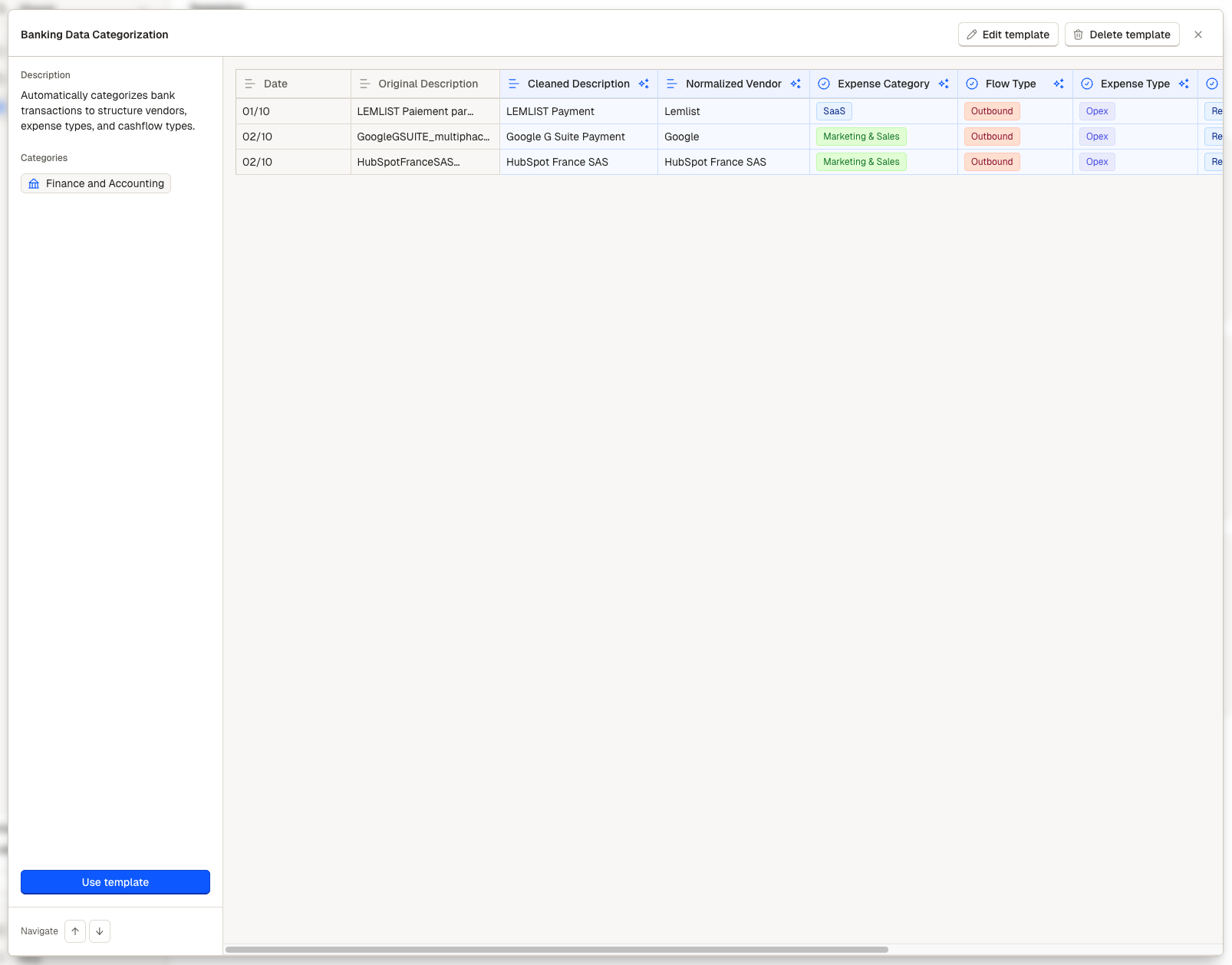
Acces the Banking categorization template via the Template Gallery
The impact
Reclaim several hours of manual categorization each month. Every transaction is automatically classified in seconds across five dimensions: expense category, flow direction, Opex/Capex, recurrence, and cost center.
Get consistent results. The agent applies the same classification rules every time. No more inconsistencies between team members or across months.
See your spend structure immediately. With normalized vendor names and analytical tags, you can group, filter, and pivot your transaction data without any cleanup.
Protect sensitive payroll data by default. Employee salary transfers are automatically masked as CONFIDENTIAL - EXCLUDE, preventing salary figures from appearing in shared reports or exports.
How your agent processes every transaction
Every bank transaction that enters the workflow goes through eight stages:
Raw description → Cleaning → Normalize vendor → Categorize expense → Detect flow → Classify Opex/Capex → Detect recurrence → Extract amount → Tag cost centers
Inputs
For each transaction, the template needs two fields
- the transaction date
- the original description string as exported from your bank.
These can be uploaded as a CSV batch or entered manually for testing.
An optional third column (Internal Control Process) lets your finance team flag each record after processing.
Processing stages
1. Description cleaning. The agent strips banking artifacts from the raw description (card codes, IBAN fragments, transaction IDs) and produces a human-readable label.
ex : OPENAI*CHATGPTSUBSCR becomes "OpenAI ChatGPT Subscription."
2. Vendor normalization. The agent extracts the merchant name and collapses all format variations into a single canonical form.
ex STRIPE 29831, Stripe FR_SAS, and Stripe Technology Europe Ltd all become "Stripe."
ℹ️ Employee salary transfers are replaced with CONFIDENTIAL - EXCLUDE to protect payroll data.
3. Expense categorization. Using both the original description and the normalized vendor name, the agent assigns each transaction to one of 15 predefined categories.
💡 You can personalize the categories to fit your accounting standards.
4. Flow type detection. The agent reads the raw description to determine whether money is coming in (Credit) or going out (Debit), using banking language signals.
5. Expense type classification. Each transaction is classified as Opex (operating expense), Capex (capital expenditure), or N/A (revenue, transfers, unclassifiable). SaaS subscriptions, meals, and salaries are Opex.
6. Recurrence detection. The agent determines whether each transaction is a recurring charge or a one-time spend.
7. Amount extraction. A code-based extraction step parses the transaction amount directly from the description string and returns a standardized decimal value.
8. Analytical tagging. Each transaction receives one or more cost center tags from eight available dimensions: Sales & Marketing, Design, Marketing, Product Marketing, Product, Engineering, AI Engineering, and G&A. A single transaction can carry multiple tags when a tool is shared across teams.

Each transaction is automatically analyzed and tagged
Where your team steps in
After the agent processes a batch, your work concentrates on validation.
- An internal control column tags "To verify" the items that need a human decision on categorization.
- Your team can either validate the categorization or modify the classification, before marking the record as Validated
- Everything item is then cleaned, normalized, categorized, tagged, and ready for reporting or accounting import
Example results
Standard SaaS subscription
| Field | Value |
|---|---|
| Original Description | OPENAI*CHATGPTSUBSCR |
| Cleaned Description | OpenAI ChatGPT Subscription |
| Normalized Vendor | OpenAI |
| Expense Category | AI & ML Tools |
| Flow Type | Debit |
| Expense Type | Opex |
| Nature | Recurring |
| Amount (€) | -20.00 |
| Analytical Tag | AI Engineering |
Incoming revenue
| Field | Value |
|---|---|
| Original Description | Virement entrant Stripe |
| Cleaned Description | Incoming Transfer — Stripe |
| Normalized Vendor | Stripe |
| Expense Category | Revenue/Income |
| Flow Type | Credit |
| Expense Type | N/A |
| Nature | Recurring |
| Amount (€) | 5200.00 |
| Analytical Tag | — |
Learn how to set up your personalized Invoice extraction worklow in the Set Up Guide
Updated 6 months ago